

Líderes
-
Mathias Kenfi
MembroPontos233Total de itens -
MatteusDeli
MembroPontos104Total de itens -

-
r0bert0lol
HéroiPontos215Total de itens


Conteúdo Popular
Exibindo conteúdo com a maior reputação em 05/04/20 em todas áreas
-
[Novos Atributos] Critical/Dodge/Life e Mana Leech/Life e Mana Absorb
thekilleron e 8 outros reagiu a Mathias Kenfi por uma resposta no tópico
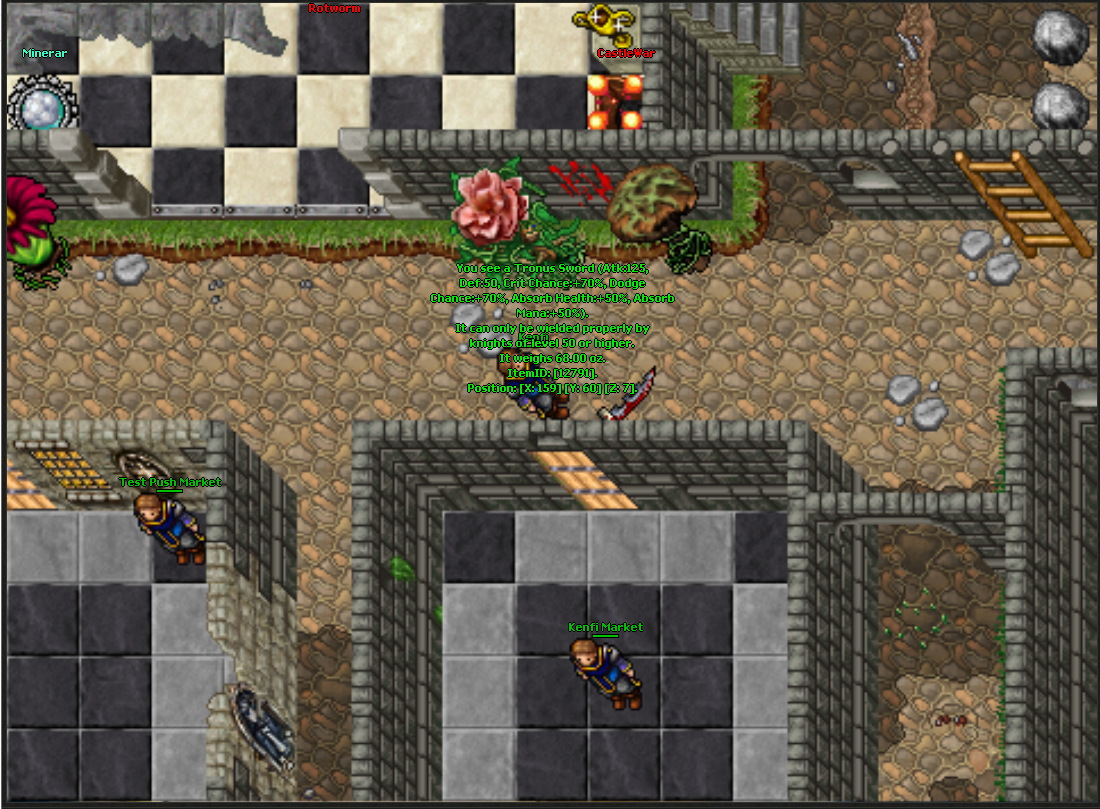
9 pontosEsse sistema foi feito utilizando a source disponibilizada neste link Pode funcionar em TFS 0.4, OTX 2.X e, talvez, em TFS 0.4 só que a probabilidade erros é maior por ter diferentes nomes de funções e variáveis. Fiz um vídeo seguindo o passo a passo abaixo para facilitar o processo de instalação do sistema. Hoje estarei ensinando a instalar os seguintes novos atributos/sistemas em sua source CriticalHitChance e DodgeChance -- (Funciona da mesma maneira que o critical básico de script, porém sem bugs de callstack) Life e Mana Absorb -- (Regenera, de acordo com a % atribuida, a partir de dano recebido) Life e Mana Leech -- (Regenera, de acordo com a % atribuida, a partir do dano causado) Exemplo de como vai ficar Primeiro e antes de tudo, você terá de desativar o critical padrão do Tibia (Você pode pular essa parte se quiser) Vamos lá! Vá em items.cpp e procure por: attackSpeed = 0; Abaixo coloque: criticalHitChance = dodgeChance = lifeAbsorb = manaAbsorb = lifeLeech = manaLeech = 0; Depois, ainda em items.cpp, procure por: else if(tmpStrValue == "extradefense" || tmpStrValue == "extradef") { if(readXMLInteger(itemAttributesNode, "chance", intValue)) it.extraDefenseChance = intValue; if(readXMLInteger(itemAttributesNode, "value", intValue)) it.extraDefense = intValue; if(readXMLInteger(itemAttributesNode, "random_min", intValue)) it.extraDefenseRndMin = intValue; if(readXMLInteger(itemAttributesNode, "random_max", intValue)) it.extraDefenseRndMax = intValue; } Abaixo coloque: else if(tmpStrValue == "criticalhitchance") { if(readXMLInteger(itemAttributesNode, "value", intValue)) it.criticalHitChance = intValue; } else if(tmpStrValue == "dodgechance") { if(readXMLInteger(itemAttributesNode, "value", intValue)) it.dodgeChance = intValue; } else if(tmpStrValue == "lifeabsorb") { if(readXMLInteger(itemAttributesNode, "value", intValue)) it.lifeAbsorb = intValue; } else if(tmpStrValue == "manaabsorb") { if(readXMLInteger(itemAttributesNode, "value", intValue)) it.manaAbsorb = intValue; } else if(tmpStrValue == "lifeleech") { if(readXMLInteger(itemAttributesNode, "value", intValue)) it.lifeLeech = intValue; } else if(tmpStrValue == "manaleech") { if(readXMLInteger(itemAttributesNode, "value", intValue)) it.manaLeech = intValue; } Agora vá em items.h e procure por: int32_t attack, extraAttack, defense, extraDefense, armor, breakChance, hitChance, maxHitChance, runeLevel, runeMagLevel, lightLevel, lightColor, decayTo, rotateTo, alwaysOnTopOrder; Abaixo coloque: int32_t criticalHitChance, dodgeChance, lifeAbsorb, manaAbsorb, lifeLeech, manaLeech; Agora vá em item.cpp e procure por: case ATTR_ATTACK: { int32_t attack; if(!propStream.getLong((uint32_t&)attack)) return ATTR_READ_ERROR; setAttribute("attack", attack); break; } Acima coloque: case ATTR_CRITICALHITCHANCE: { int32_t criticalHitChance; if(!propStream.getLong((uint32_t&)criticalHitChance)) return ATTR_READ_ERROR; setAttribute("criticalhitchance", criticalHitChance); break; } case ATTR_DODGECHANCE: { int32_t dodgeChance; if(!propStream.getLong((uint32_t&)dodgeChance)) return ATTR_READ_ERROR; setAttribute("dodgechance", dodgeChance); break; } case ATTR_LIFEABSORB: { int32_t lifeAbsorb; if(!propStream.getLong((uint32_t&)lifeAbsorb)) return ATTR_READ_ERROR; setAttribute("lifeabsorb", lifeAbsorb); break; } case ATTR_MANAABSORB: { int32_t manaAbsorb; if(!propStream.getLong((uint32_t&)manaAbsorb)) return ATTR_READ_ERROR; setAttribute("manaabsorb", manaAbsorb); break; } case ATTR_LIFELEECH: { int32_t lifeLeech; if(!propStream.getLong((uint32_t&)lifeLeech)) return ATTR_READ_ERROR; setAttribute("lifeleech", lifeLeech); break; } case ATTR_MANALEECH: { int32_t manaLeech; if(!propStream.getLong((uint32_t&)manaLeech)) return ATTR_READ_ERROR; setAttribute("manaleech", manaLeech); break; } Procure por: if(it.weaponType == WEAPON_DIST && it.ammoType != AMMO_NONE) { begin = false; s << " (Range:" << int32_t(item ? item->getShootRange() : it.shootRange); if(it.attack || it.extraAttack || (item && (item->getAttack() || item->getExtraAttack()))) { s << ", Atk " << std::showpos << int32_t(item ? item->getAttack() : it.attack); if(it.extraAttack || (item && item->getExtraAttack())) s << " " << std::showpos << int32_t(item ? item->getExtraAttack() : it.extraAttack) << std::noshowpos; } if(it.hitChance != -1 || (item && item->getHitChance() != -1)) s << ", Hit% " << std::showpos << (item ? item->getHitChance() : it.hitChance) << std::noshowpos; } else if(it.weaponType != WEAPON_AMMO && it.weaponType != WEAPON_WAND) { if(it.attack || it.extraAttack || (item && (item->getAttack() || item->getExtraAttack()))) { begin = false; s << " (Atk:"; if(it.abilities.elementType != COMBAT_NONE && it.decayTo < 1) { s << std::max((int32_t)0, int32_t((item ? item->getAttack() : it.attack) - it.abilities.elementDamage)); if(it.extraAttack || (item && item->getExtraAttack())) s << " " << std::showpos << int32_t(item ? item->getExtraAttack() : it.extraAttack) << std::noshowpos; s << " physical + " << it.abilities.elementDamage << " " << getCombatName(it.abilities.elementType); } else { s << int32_t(item ? item->getAttack() : it.attack); if(it.extraAttack || (item && item->getExtraAttack())) s << " " << std::showpos << int32_t(item ? item->getExtraAttack() : it.extraAttack) << std::noshowpos; } } if(it.defense || it.extraDefense || (item && (item->getDefense() || item->getExtraDefense()))) { if(begin) { begin = false; s << " ("; } else s << ", "; s << "Def:" << int32_t(item ? item->getDefense() : it.defense); if(it.extraDefense || (item && item->getExtraDefense())) s << " " << std::showpos << int32_t(item ? item->getExtraDefense() : it.extraDefense) << std::noshowpos; } } Abaixo coloque: if(it.criticalHitChance || (item && item->getCriticalHitChance())) { if(begin) { begin = false; s << " ("; } else s << ", "; s << "Crit Chance:" << std::showpos << int32_t(item ? item->getCriticalHitChance() : it.criticalHitChance) << "%"<< std::noshowpos; } if(it.dodgeChance || (item && item->getDodgeChance())) { if(begin) { begin = false; s << " ("; } else s << ", "; s << "Dodge Chance:" << std::showpos << int32_t(item ? item->getDodgeChance() : it.dodgeChance) << "%"<< std::noshowpos; } if(it.lifeAbsorb || (item && item->getLifeAbsorb())) { if(begin) { begin = false; s << " ("; } else s << ", "; s << "Life Absorb:" << std::showpos << int32_t(item ? item->getLifeAbsorb() : it.lifeAbsorb) << "%"<< std::noshowpos; } if(it.manaAbsorb || (item && item->getManaAbsorb())) { if(begin) { begin = false; s << " ("; } else s << ", "; s << "Mana Absorb:" << std::showpos << int32_t(item ? item->getManaAbsorb() : it.manaAbsorb) << "%"<< std::noshowpos; } if(it.lifeLeech || (item && item->getLifeLeech())) { if(begin) { begin = false; s << " ("; } else s << ", "; s << "Life Leech:" << std::showpos << int32_t(item ? item->getLifeLeech() : it.lifeLeech) << "%"<< std::noshowpos; } if(it.manaLeech || (item && item->getManaLeech())) { if(begin) { begin = false; s << " ("; } else s << ", "; s << "Mana Leech:" << std::showpos << int32_t(item ? item->getManaLeech() : it.manaLeech) << "%"<< std::noshowpos; } Procure por: int32_t tmp = it.armor; if(item) tmp = item->getArmor(); bool begin = true; if(tmp) { s << " (Arm:" << tmp; begin = false; } Abaixo coloque: if(it.criticalHitChance || (item && item->getCriticalHitChance())) { if(begin) { begin = false; s << " ("; } else s << ", "; s << "Crit Chance:" << std::showpos << int32_t(item ? item->getCriticalHitChance() : it.criticalHitChance) << "%"<< std::noshowpos; } if(it.dodgeChance || (item && item->getDodgeChance())) { if(begin) { begin = false; s << " ("; } else s << ", "; s << "Dodge Chance:" << std::showpos << int32_t(item ? item->getDodgeChance() : it.dodgeChance) << "%"<< std::noshowpos; } if(it.lifeAbsorb || (item && item->getLifeAbsorb())) { if(begin) { begin = false; s << " ("; } else s << ", "; s << "Life Absorb:" << std::showpos << int32_t(item ? item->getLifeAbsorb() : it.lifeAbsorb) << "%"<< std::noshowpos; } if(it.manaAbsorb || (item && item->getManaAbsorb())) { if(begin) { begin = false; s << " ("; } else s << ", "; s << "Mana Absorb:" << std::showpos << int32_t(item ? item->getManaAbsorb() : it.manaAbsorb) << "%"<< std::noshowpos; } if(it.lifeLeech || (item && item->getLifeLeech())) { if(begin) { begin = false; s << " ("; } else s << ", "; s << "Life Leech:" << std::showpos << int32_t(item ? item->getLifeLeech() : it.lifeLeech) << "%"<< std::noshowpos; } if(it.manaLeech || (item && item->getManaLeech())) { if(begin) { begin = false; s << " ("; } else s << ", "; s << "Mana Leech:" << std::showpos << int32_t(item ? item->getManaLeech() : it.manaLeech) << "%"<< std::noshowpos; } Agora vá em item.h e procure por: ATTR_DUALWIELD = 43, Abaixo coloque: ATTR_CRITICALHITCHANCE = 44, ATTR_DODGECHANCE = 45, ATTR_LIFEABSORB = 46, ATTR_MANAABSORB = 47, ATTR_LIFELEECH = 48, ATTR_MANALEECH = 49, Procure por: int32_t getExtraDefense() const; Abaixo coloque: int32_t getCriticalHitChance() const; int32_t getDodgeChance() const; int32_t getLifeAbsorb() const; int32_t getManaAbsorb() const; int32_t getLifeLeech() const; int32_t getManaLeech() const; Procure por: inline int32_t Item::getExtraDefense() const { bool ok; int32_t v = getIntegerAttribute("extradefense", ok); if(ok) return v; return items[id].extraDefense; } Abaixo coloque: inline int32_t Item::getCriticalHitChance() const { bool ok; int32_t v = getIntegerAttribute("criticalhitchance", ok); if(ok) return v; return items[id].criticalHitChance; } inline int32_t Item::getDodgeChance() const { bool ok; int32_t v = getIntegerAttribute("dodgechance", ok); if(ok) return v; return items[id].dodgeChance; } inline int32_t Item::getLifeAbsorb() const { bool ok; int32_t v = getIntegerAttribute("lifeabsorb", ok); if(ok) return v; return items[id].lifeAbsorb; } inline int32_t Item::getManaAbsorb() const { bool ok; int32_t v = getIntegerAttribute("manaabsorb", ok); if(ok) return v; return items[id].manaAbsorb; } inline int32_t Item::getLifeLeech() const { bool ok; int32_t v = getIntegerAttribute("lifeleech", ok); if(ok) return v; return items[id].lifeLeech; } inline int32_t Item::getManaLeech() const { bool ok; int32_t v = getIntegerAttribute("manaleech", ok); if(ok) return v; return items[id].manaLeech; } Agora vá em player.cpp e procure por: int32_t Player::getArmor() const { int32_t i = SLOT_FIRST, armor = 0; for(; i < SLOT_LAST; ++i) { if(Item* item = getInventoryItem((slots_t)i)) armor += item->getArmor(); } if(vocation->getMultiplier(MULTIPLIER_ARMOR) != 1.0) return int32_t(armor * vocation->getMultiplier(MULTIPLIER_ARMOR)); return armor; } Abaixo coloque: int32_t Player::getCriticalHitChance() const { int32_t i = SLOT_FIRST, crit = 0; for(; i < SLOT_LAST; ++i) { if(Item* item = getInventoryItem((slots_t)i)) crit += item->getCriticalHitChance(); } return crit; } int32_t Player::getDodgeChance() const { int32_t i = SLOT_FIRST, dodge = 0; for(; i < SLOT_LAST; ++i) { if(Item* item = getInventoryItem((slots_t)i)) dodge += item->getDodgeChance(); } return dodge; } int32_t Player::getLifeAbsorb() const { int32_t i = SLOT_FIRST, life = 0; for(; i < SLOT_LAST; ++i) { if(Item* item = getInventoryItem((slots_t)i)) life += item->getLifeAbsorb(); } return life; } int32_t Player::getManaAbsorb() const { int32_t i = SLOT_FIRST, mana = 0; for(; i < SLOT_LAST; ++i) { if(Item* item = getInventoryItem((slots_t)i)) mana += item->getManaAbsorb(); } return mana; } int32_t Player::getLifeLeech() const { int32_t i = SLOT_FIRST, life = 0; for(; i < SLOT_LAST; ++i) { if(Item* item = getInventoryItem((slots_t)i)) life += item->getLifeLeech(); } return life; } int32_t Player::getManaLeech() const { int32_t i = SLOT_FIRST, mana = 0; for(; i < SLOT_LAST; ++i) { if(Item* item = getInventoryItem((slots_t)i)) mana += item->getManaLeech(); } return mana; } Agora vá em player.h e procure por: virtual int32_t getDefense() const; Abaixo coloque: virtual int32_t getCriticalHitChance() const; virtual int32_t getDodgeChance() const; virtual int32_t getLifeAbsorb() const; virtual int32_t getManaAbsorb() const; virtual int32_t getLifeLeech() const; virtual int32_t getManaLeech() const; Agora vá em luascript.cpp e procure por: //getCreatureHealth(cid) lua_register(m_luaState, "getCreatureHealth", LuaInterface::luaGetCreatureHealth); Abaixo coloque: //getPlayerCriticalHitChance(cid) lua_register(m_luaState, "getPlayerCriticalHitChance", LuaInterface::luaGetPlayerCriticalHitChance); //getPlayerDodgeChance(cid) lua_register(m_luaState, "getPlayerDodgeChance", LuaInterface::luaGetPlayerDodgeChance); //getPlayerLifeAbsorb(cid) lua_register(m_luaState, "getPlayerLifeAbsorb", LuaInterface::luaGetPlayerLifeAbsorb); //getPlayerManaAbsorb(cid) lua_register(m_luaState, "getPlayerManaAbsorb", LuaInterface::luaGetPlayerManaAbsorb); //getPlayerLifeLeech(cid) lua_register(m_luaState, "getPlayerLifeLeech", LuaInterface::luaGetPlayerLifeLeech); //getPlayerManaLeech(cid) lua_register(m_luaState, "getPlayerManaLeech", LuaInterface::luaGetPlayerManaLeech); Procure por: int32_t LuaInterface::luaGetCreatureMaxHealth(lua_State* L) { //getCreatureMaxHealth(cid[, ignoreModifiers = false]) bool ignoreModifiers = false; if(lua_gettop(L) > 1) ignoreModifiers = popBoolean(L); ScriptEnviroment* env = getEnv(); if(Creature* creature = env->getCreatureByUID(popNumber(L))) lua_pushnumber(L, creature->getPlayer() && ignoreModifiers ? creature->healthMax : creature->getMaxHealth()); else { errorEx(getError(LUA_ERROR_CREATURE_NOT_FOUND)); lua_pushboolean(L, false); } return 1; } Abaixo coloque: int32_t LuaInterface::luaGetPlayerCriticalHitChance(lua_State* L) { //getPlayerCriticalHitChance(cid) ScriptEnviroment* env = getEnv(); if(Player* player = env->getPlayerByUID(popNumber(L))) lua_pushnumber(L, player->getCriticalHitChance()); else { errorEx(getError(LUA_ERROR_PLAYER_NOT_FOUND)); lua_pushboolean(L, false); } return 1; } int32_t LuaInterface::luaGetPlayerDodgeChance(lua_State* L) { //getPlayerDodgeChance(cid) ScriptEnviroment* env = getEnv(); if(Player* player = env->getPlayerByUID(popNumber(L))) lua_pushnumber(L, player->getDodgeChance()); else { errorEx(getError(LUA_ERROR_CREATURE_NOT_FOUND)); lua_pushboolean(L, false); } return 1; } int32_t LuaInterface::luaGetPlayerLifeAbsorb(lua_State* L) { //getPlayerLifeAbsorb(cid) ScriptEnviroment* env = getEnv(); if(Player* player = env->getPlayerByUID(popNumber(L))) lua_pushnumber(L, player->getLifeAbsorb()); else { errorEx(getError(LUA_ERROR_CREATURE_NOT_FOUND)); lua_pushboolean(L, false); } return 1; } int32_t LuaInterface::luaGetPlayerManaAbsorb(lua_State* L) { //getPlayerManaAbsorb(cid) ScriptEnviroment* env = getEnv(); if(Player* player = env->getPlayerByUID(popNumber(L))) lua_pushnumber(L, player->getManaAbsorb()); else { errorEx(getError(LUA_ERROR_CREATURE_NOT_FOUND)); lua_pushboolean(L, false); } return 1; } int32_t LuaInterface::luaGetPlayerLifeLeech(lua_State* L) { //getPlayerLifeLeech(cid) ScriptEnviroment* env = getEnv(); if(Player* player = env->getPlayerByUID(popNumber(L))) lua_pushnumber(L, player->getLifeLeech()); else { errorEx(getError(LUA_ERROR_CREATURE_NOT_FOUND)); lua_pushboolean(L, false); } return 1; } int32_t LuaInterface::luaGetPlayerManaLeech(lua_State* L) { //getPlayerManaLeech(cid) ScriptEnviroment* env = getEnv(); if(Player* player = env->getPlayerByUID(popNumber(L))) lua_pushnumber(L, player->getManaLeech()); else { errorEx(getError(LUA_ERROR_CREATURE_NOT_FOUND)); lua_pushboolean(L, false); } return 1; } Agora vá em luascript.h e procure por: static int32_t luaGetPlayerSpentMana(lua_State* L); Abaixo coloque: static int32_t luaGetPlayerCriticalHitChance(lua_State* L); static int32_t luaGetPlayerDodgeChance(lua_State* L); static int32_t luaGetPlayerLifeAbsorb(lua_State* L); static int32_t luaGetPlayerManaAbsorb(lua_State* L); static int32_t luaGetPlayerLifeLeech(lua_State* L); static int32_t luaGetPlayerManaLeech(lua_State* L); As funções Lua adicionadas foram getPlayerCriticalHitChance(cid) getPlayerDodgeChance(cid) getPlayerLifeAbsorb(cid) getPlayerManaAbsorb(cid) getPlayerLifeLeech(cid) getPlayerManaLeech(cid) Agora a parte do game.cpp. (Esta é uma parte opcional, você pode optar por não adicioná-la) Créditos: ~Mathias Kenfi 9 pontos
 -
Exp Banner
FlamesAdmin e um outro reagiu a MatteusDeli por uma resposta no tópico
2 pontosBoa noite, não sei se já existe este script aqui no fórum caso não aqui está. Este script foi testado na versão 8.6 TFS 0.4, funciona em servidores de Tibia, Pokemon, Narutibia etc... Bom neste script eu tive como base o script de banner da PXG aonde você coloca ele em uma Hunt e ganha uma porcentagem X a mais de experiencia. Instalando o Script - Vá em data/lib crie um arquivo com o nome bannerExp.lua e cole o código abaixo nele: -- Configurações -- effect_invoke_banner = 10 -- efeito que saira no banner quando ele for colocado no chao effect_decay_banner = 2 -- efeito que saira no banner quando o tempo dele acabar effect_kill_banner = 36 -- efeito que saira no banner quando o player matar um monstro e ganhar o bonus de exp banner_radius_x = 5 -- distancia maxima em x que ira ocorreu o bonus banner_radius_y = 5 -- distancia maxima em y que ira ocorreu o bonus time_in_minutes = 60 -- configurado em minutos (caso queira em horas só colocar 60 * 60) remove_banner_item = false -- Se estiver TRUE o item de criacao do banner sera removido do player, caso esteja FALSE o item não sera removido. config_banner = { --[ID DO ITEM CRIAR O BANNER] = {banner_id = ID DO BANNER, exp_bonus = % EXP PLAYER IRA GANHAR, time_left = TEMPO PARA SUBIR O BANNER}, [4865] = {banner_id = 8617, exp_bonus = 20, time_left = 20}, [4866] = {banner_id = 8618, exp_bonus = 25, time_left = 10}, [4867] = {banner_id = 8619, exp_bonus = 35, time_left = 15}, [4868] = {banner_id = 8620, exp_bonus = 45, time_left = 20}, } -- Não Mexer -- time_banner = 7899987 player_use_banner = 78999788 storage_banner_x = 7889911 storage_banner_y = 7889912 storage_banner_z = 7889913 storage_banner_id = 7884544 storage_exp = 7889915 rate_level = SKILL__LEVEL - Agora vá em data/actions/scripts e crie um arquivo chamado bannerexp.lua e cole isto dentro: function onUse(cid, item, frompos, itemEx, topos) if (getPlayerStorageValue(cid, player_use_banner) >= 1) then doPlayerSendTextMessage(cid, MESSAGE_STATUS_CONSOLE_ORANGE, "Voce ja esta usando o banner.") return true end if (config_banner[item.itemid]) then local banner = config_banner[item.itemid] if (remove_banner_item == true or remove_banner_item == TRUE) then doPlayerRemoveItem(cid, item.itemid, 1) end CreateBanner(cid, banner, itemEx) TimeBannerCheck(cid, banner, getThingPos(itemEx.uid)) EffectBanner(getThingPos(itemEx.uid)) end end function CreateBanner(cid, banner, itemEx) doCreateItem(banner.banner_id, getThingPos(itemEx.uid)) doSendMagicEffect(getThingPos(itemEx.uid), effect_invoke_banner) doPlayerSendTextMessage(cid, MESSAGE_STATUS_CONSOLE_ORANGE, "Voce usou o banner de ["..banner.exp_bonus.."% EXP], ele tem duração de "..banner.time_left.." minuto(s).") setPlayerStorageValue(cid, storage_banner_x, getThingPos(itemEx.uid).x) setPlayerStorageValue(cid, storage_banner_y, getThingPos(itemEx.uid).y) setPlayerStorageValue(cid, storage_banner_z, getThingPos(itemEx.uid).z) setPlayerStorageValue(cid, storage_banner_id, banner.banner_id) setPlayerStorageValue(cid, storage_exp, banner.exp_bonus) setPlayerStorageValue(cid, player_use_banner, 1) setPlayerStorageValue(cid, time_banner, os.time() + (banner.time_left * time_in_minutes)) end function TimeBannerCheck(cid, banner, banner_pos) if not isCreature(cid) then doRemoveItem(getTileItemById(banner_pos, banner.banner_id).uid) doSendMagicEffect(banner_pos, effect_decay_banner) return true end if (getPlayerStorageValue(cid, time_banner) == os.time()) then doRemoveItem(getTileItemById(banner_pos, banner.banner_id).uid) doSendMagicEffect(banner_pos, effect_decay_banner) setPlayerStorageValue(cid, player_use_banner, -1) doPlayerSendTextMessage(cid, MESSAGE_STATUS_CONSOLE_ORANGE, "O Banner de ["..banner.exp_bonus.."% EXP] terminou.") return true end addEvent(function() TimeBannerCheck(cid, banner, banner_pos) end, 1000) end - Em Actions.XML cole esta tag: <action itemid="4865" script="bannerexp.lua"/> Aonde está 4865 você coloca o(s) ITEM_ID que será usado para summonar o banner no chão. - Agora vá em data/creatureevents/scripts crie um arquivo chamado bannerexp.lua e cole isto dentro dele: function onKill(cid, target) if not isMonster(target) then return true end if (getPlayerStorageValue(cid, storage_banner_id) <= -1) then return true end local banner_pos = {x=getPlayerStorageValue(cid, storage_banner_x), y=getPlayerStorageValue(cid, storage_banner_y), z=getPlayerStorageValue(cid, storage_banner_z)} if (getTileItemById(banner_pos, getPlayerStorageValue(cid, storage_banner_id)).uid >= 1) then if not (CheckPlayerInArea(cid, banner_pos)) then doPlayerSendTextMessage(cid, MESSAGE_STATUS_CONSOLE_ORANGE, "Voce esta fora da area do bonus.") end else doPlayerSetRate(cid, rate_level,1) end return true end function CheckPlayerInArea(cid, banner_pos) for x=banner_pos.x-banner_radius_x, banner_pos.x+banner_radius_x do for y=banner_pos.y-banner_radius_y, banner_pos.y+banner_radius_y do local banner_area = {x=x,y=y,z=banner_pos.z} local player = getTopCreature(banner_area).uid if (isPlayer(player)) then AddBonusExp(cid, banner_pos) return true end end end end function AddBonusExp(cid, banner_pos) doPlayerSetExperienceRate(cid, (1+(getPlayerStorageValue(cid, storage_exp)/100))+(getPlayerExtraExpRate(cid)/100)) doSendMagicEffect(banner_pos, effect_kill_banner) end function getPlayerExtraExpRate(cid) return (getPlayerRates(cid)[rate_level]-1)*100 end - Em Creatureevents.XML cole está tag: <event type="kill" name="BannerExp" event="script" value="bannerexp.lua"/> - Agora no arquivo login.lua em data/creatureevents/scripts cole este código antes do último return true: registerCreatureEvent(cid, "BannerExp") if (getPlayerStorageValue(cid, 78999788) >= 1) then setPlayerStorageValue(cid, 78999788, -1) end Explicação: (Configuração fica no arquivo adicionado no data/lib) 1° Aqui você configura a área em que o player tem que estar matando o monstro para poder ganhar o bônus banner_radius_x = 5 -- distancia maxima em x que ira ocorreu o bonus banner_radius_y = 5 -- distancia maxima em y que ira ocorreu o bonus 2° Aqui você adiciona um novo banner (Lembre-se de adicionar o itemid que você colocar entre colchetes lá na tag em Actions.XML) -[ID DO ITEM CRIAR O BANNER] = {banner_id = ID DO BANNER, exp_bonus = % EXP PLAYER IRA GANHAR, time_left = TEMPO PARA SUMIR O BANNER}, É isso... Script básico mais eu acho que vai ser bastante útil para muitos servidores. -- ATUALIZAÇÃO -- - Adicionado mensagem quando o player sair da área do bônus! - Adicionado variável que controla se o item da criação do banner será removido do player ou não. (Alterar a variável remove_banner_item em data/lib/bannerExp.lua).2 pontos -
[Loot Channel] -- Tutorial como adicionar Loot Channel
Tokias reagiu a Mathias Kenfi por uma resposta no tópico
1 ponto[TESTADO EM OTX 2.1+] 8.60 [TESTADO EM TFS 0.3.6] 8.54 ~ 8.60 Créditos: ~Mathias Kenfi 1 ponto
 -
[Novos Atributos] Critical/Dodge/Life e Mana Leech/Life e Mana Absorb
Spooky Ghost reagiu a Mathias Kenfi por uma resposta no tópico
1 pontoTodos os arquivos estão citados. items.cpp items.h item.cpp item.h player.cpp player.h game.cpp1 ponto -
[Novos Atributos] Critical/Dodge/Life e Mana Leech/Life e Mana Absorb
Cat reagiu a Diego Rulez por uma resposta no tópico
1 pontoÉ muito bom ver que ainda temos alguns realmente contribuindo com a ideia de OpenSource.. Apesar de do Dodge e Critical serem sistemas que todo mundo já possui de alguma forma, se conseguíssemos padronizar todo mundo pra usar esse seria mais fácil pra todos.1 ponto -
[Novos Atributos] Critical/Dodge/Life e Mana Leech/Life e Mana Absorb
LeoTK reagiu a Mathias Kenfi por uma resposta no tópico
1 pontoEles somam1 ponto -
você deve configurar seu xampp. Acesse http://localhost/security/xamppsecurity.php Escolha a linguagem portuguesa e depois vai em segurança. Configure as senhas e reinicie seu XAMPP. Caso não consiga acessar esta pagina, recomendo reinstalar o XAMPP e acessar esta página antes de por seu site no htdocs.1 ponto
-
NPC QUEST STORAGE NAO DA SEQUENCIA
MatteusDeli reagiu a robsu por uma resposta no tópico
1 pontoPerfeito! Funcionou, muito obrigado!1 ponto -
NPC QUEST STORAGE NAO DA SEQUENCIA
robsu reagiu a MatteusDeli por uma resposta no tópico
1 ponto@robsu Boa tarde, tente assim:1 ponto -
[8.60][OLD Client] Narutibia (NTO HARD) - Servidor Completo
jokenpoke889 reagiu a r0bert0lol por uma resposta no tópico
1 pontoTem que usar a minha config.lua Esse bug dos jogadores não atacar é porque o server tem sistema ANTI BOT, Anti Auto Target ! Só ataca na mão e se você apagar a função do config.lua vai bugar mesmo. Vou fazer um video ensinando a configurar tudo, usar o ubuntu e logo posto aqui.1 ponto -
Na verdade, foi simples como eu vi que ninguém ia ajudar, baixei outro servidor PDA onde as passivas não era bugada, aí troquei o statschange, e o pokemon moves, e claro que gerou alguns erros pois precisava modificar os nomes e tudo, mas agora está 100%, e essa foi a solução1 ponto
-
[8.60] Wodbo Wars v5.9 + Site + Client Download
Toca do Aranha reagiu a Cat por uma resposta no tópico
1 ponto@Yan Liima A acusação procede? Preciso fazer o scan completo de todos os arquivos ou posso confiar que o scan apresentado na denúncia foi resolvido? Resolvido por pm, o arquivo em questão foi removido pelo autor do tópico.1 ponto -
[8.60][OLD Client] Narutibia (NTO HARD) - Servidor Completo
r0bert0lol reagiu a Belmont por uma resposta no tópico
1 pontoConsegui abrir aqui já @r0bert0lol tive que modificar uma coisas no config.lua para funcionar, quem quiser da uma olhada por dentro do servidor, só entrar lá criar conta. Vllw pelo suporte1 ponto -
1 ponto
-
Exp Banner
MatteusDeli reagiu a Naze por uma resposta no tópico
1 pontoMuito bom, logo irei testar.1 ponto -
Mapa castelo para Tíbia 8.54
S H I O N reagiu a Renan Gerson por uma resposta no tópico
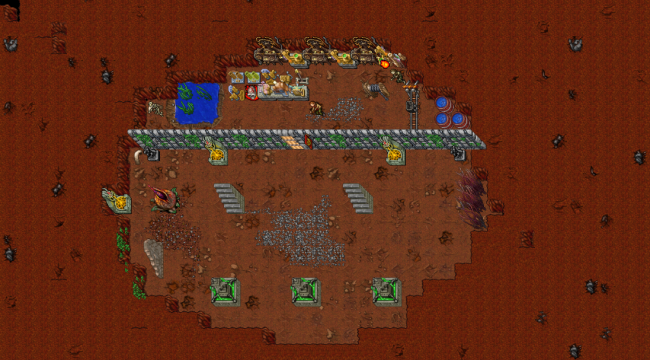
1 pontoBom, sempre que eu tiver um tempo disponível eu irei trazer algumas criações de mapas para servidores 8.54. Ao longo do tópico irão ver imagens do mapa criado por mim chamado " Castelo/Castle ". Caso queira pegar o projeto e fazer melhorias para postar no fórum certifique-se de dar os devidos créditos: -------------------------------------------------- Inicialmente criado por: Renan Gerson Modificado e melhorado por: ( SEU NOME ) -------------------------------------------------- Dês de já se consegui te ajudar da REP+ -O mapa mostrando nas imagens é um castelo com apenas um acesso ( frontal/ponte ). -Possuindo algumas casas dentro dele e uma "área real" logo a cima da entrada, uma subida em cada parte da frente do castelo para visualizar novos inimigos se aproximando e caminhos diretos da frente até a "área real". -Também possuindo duas decidas para a área de maquinas ( onde faz a energia chegar nas cassas dos moradores ). -OBS: portas não testadas. Download: https://www.mediafire.com/file/hbf6ci2fugfphow/Mapa_Castelo-Renan_Gerson.rar/file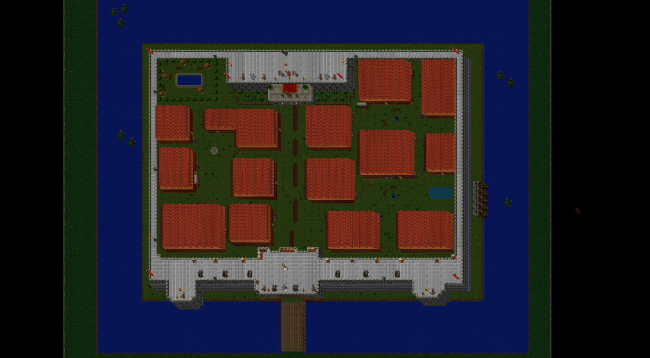

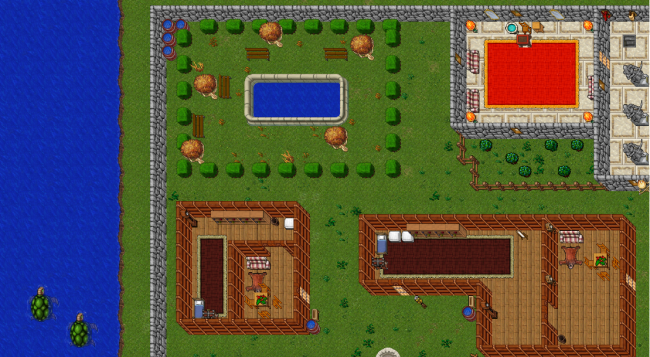

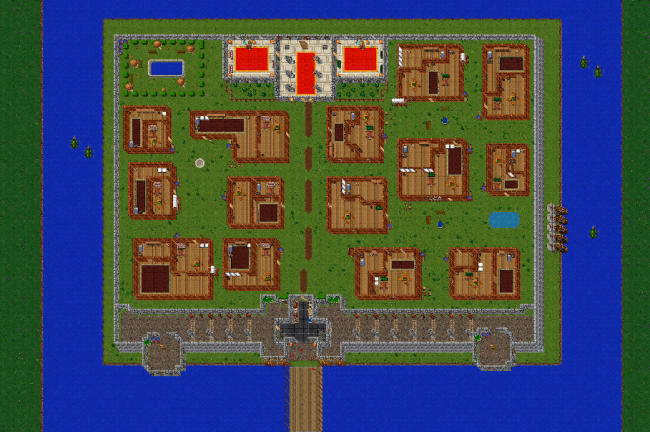
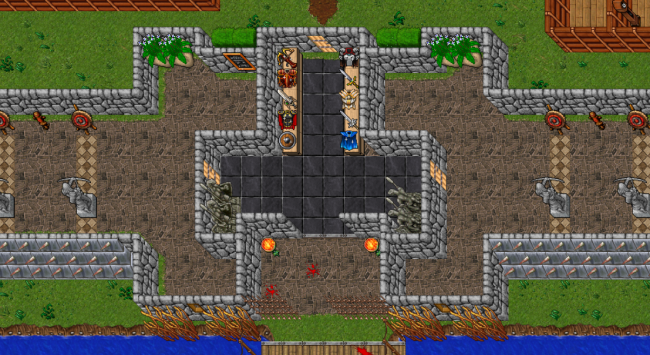

 1 ponto
 -
1 pontoGostei muito @Namikaze simples e belo. Nos esgotos adicionaria um pouco mais de "sujidade" como é um ambiente úmido, seria bacana adicionar musgos, um pouco de barro, mais algumas pedrinhas e tal, só pra dar um toque final ?1 ponto
-
1 pontoOlá @Magalhaes92, tudo bem? Primeiramente, verifique no seu config.lua o seu packetsPerSecond. O mesmo não pode ultrapassar 450. (recomendo 350 ou 400) Agora tente modificar a porta do SSH e instalar uma proteção para DDoS. Não vai ser as melhores opções, mas vai te ajudar muito. Não copie o $: $ nano /etc/ssh/sshd_config Procure por algo parecido como Port 22, modifique para um à sua escolha. Sempre que você for acessar sua máquina, você não irá usar a porta 22 e sim, a porta que você escolheu. Reinicie o SSH: $ service ssh restart Beleza, agora só você saberá o valor da porta SSH, ficará mais difícil atacarem esta porta. Instale agora um CSF dentro de uma Screen e configure: (caso não tenha screen, utilize o comando: apt get install screen -y) $ screen -S CSF $ cd /home $ rm -fv csf.tgz $ wget https://download.configserver.com/csf.tgz $ tar -xzf csf.tgz $ cd csf $ sh install.sh $ nano /etc/csf/csf.conf Use CTRL + W e procure por: TESTING = "1", mude para 0 Configure tudo: Lembre-se: Onde estiver XXXX, troque pela porta SSH. (Coloquei em XXXX pensando que você modificará a sua porta SSH) TCP_IN = "80,7171,7172,XXXX" TCP_OUT = "80,7171,7172" UDP_IN = "" UDP_OUT = "" TCP6_IN = "80,7171,7172,XXXX" TCP6_OUT = "80,7171,7172" UDP6_IN = "" UDP6_OUT = "" CT_LIMIT = "100" SYNFLOOD = "1" SYNFLOOD_RATE = "150/s" SYNFLOOD_BURST = "200" UDPFLOOD = "1" PORTFLOOD = "80;tcp;20;5,7171;tcp;20;5,7172;tcp;20;5,XXXX;tcp;5;60" PS_INTERVAL = "1500" PS_LIMIT = "20" Agora reinicie o CSF para aplicar as modificações: $ csf -r Caso seu CSF esteja desativado, utilize: $ csf -e AVISO: Caso cometa algum erro nas configurações acima, você perderá acesso à maquina. Não preciso comentar o que vai ocorrer né1 ponto
-
[8.60][OLD Client] Narutibia (NTO HARD) - Servidor Completo
FlamesAdmin reagiu a r0bert0lol por uma resposta no tópico
1 pontoGalera tópico atualizado, adicionei o banco de dados que eu estava utilizando. Acabei de reinstalar o servidor para um colega, utilizei um Ubuntu 14.04 e tudo está funcionando 100 % ( A única coisa que faltava era o banco de dados ) Eu gostaria de organizar, montar um tutorial step-by-step ensinando como colocar o servidor Online porém estou sem tempo, mas posso garantir que não há problemas com os arquivos o pack está completo agora com o banco de dados. Um Guia para você que não sabe por onde começar : Consiga uma VPS de preferência utilize o Sistema Operacional em que o server foi testado ( Ubuntu 14.04 ) Atualize as libs da sua VPS e Instale : Apache + Mysql + PhpMyAdmin ( Você pode encontrar Tutoriais aqui no Fórum ) Configure / Importe um banco de dados no PhpMyAdmin ( Agora tem banco de dados disponível ) Gerencie os arquivos, coloque o servidor no diretório /home e o site no diretório /var/www e não esqueça de editar os arquivos config.lua e config.php Com todos os arquivos configurados e posicionados no local correto, seu site já deve estar funcionando. Compile o servidor ( Caso esteja usando ubuntu 14.04 já tem uma distro compilada ) para compilar ( Você pode encontrar Tutoriais aqui no Fórum ) Agora com site funcionando e distro rodando, você apenas precisará configurar o Client do servidor para se conectar. O Client funcionará apenas após trocar o IP do executável, voce pode usar ip changer ou usar um hex editor para alterar definitivamente. Agora com client redirecionando para o IP da sua VPS você já pode se conectar no game. dbresetada.sql Estou pensando em fazer um vídeo tutorial no Youtube colocando Online o servidor em um Ubuntu,. Nesse vídeo eu passaria algumas dícas para quem está começando a usar Linux e realizaria um passo a passo do que é necessário para você conseguir deixar o servidor Online em qualquer VPS. Caso alguém se interesse, deixa um Rep + Aí que assim que surgir um tempo eu gravo o vídeo para vocês.1 ponto -
(Resolvido)[PEDIDO] Puxar alavanca e surgir monsters
alexpaimel reagiu a MatteusDeli por uma resposta no tópico
1 ponto@juvelino position_lobby = { -- Posição da sala no formato quadrado x1 = {x=174,y=61,z=7}, x2 = {x=180,y=67,z=7} } summons = { [1] = { monster= "Demon", pos= {x = 174 ,y = 61,z = 7}}, [2] = { monster= "Demon", pos={x = 180,y = 67,z = 7}}, --[3] = {monster = "Morgaroth", pos = {x= 181, y= 55, z= 7}}, } mensagemBroadcast = "Tem um time upando nas ruínas" function onUse(cid, item, fromPosition, itemEx, toPosition) local monsters_in_lobby = {} for posX=position_lobby.x1.x, position_lobby.x2.x do for posY=position_lobby.x1.y, position_lobby.x2.y do local newPos = {x=posX,y=posY,z=7, stackpos=253} local monsters = getTopCreature(newPos).uid if (isMonster(monsters)) then if (monsters > 0) then table.insert(monsters_in_lobby, monsters) end end end end if (#monsters_in_lobby == 0) then for i=1, #summons do doCreateMonster(summons[i].monster, summons[i].pos) end SetSwitch(item) doBroadcastMessage(mensagemBroadcast) else doPlayerSendCancel(cid, "Voce tem que matar todos os demons.") end return true end function SetSwitch(item) if (item.itemid == 1945) then doTransformItem(item.uid, item.itemid+1) end if (item.itemid == 1946) then doTransformItem(item.uid, item.itemid-1) end end1 ponto -
(Resolvido)[PEDIDO] Não poder mover players no trainers
Lincoln123123 reagiu a FlavioHulk por uma resposta no tópico
1 pontolocal config = { targetList = { [1] = 'purching bag' }, access = 3 -- Gamemaster } function onPush(cid, target) if getPlayerAccess(cid) >= config.access then return true end if target == cid or not isPlayer(target) then return true end if (getCreatureTarget(target) > 0 and isInArray(config.targetList, getCreatureName(getCreatureTarget(target)):lower())) then doPlayerSendCancel(cid, "You cannot move this player.") return false end return true end1 ponto -
O dinheiro fica no loot ? Daí ele duplica e vai banco? É isso mesmo ofensa removida Pq já fui lá ver e nada....-1 pontos