

Líderes




Conteúdo Popular
Exibindo conteúdo com a maior reputação em 04/29/19 em todas áreas
-
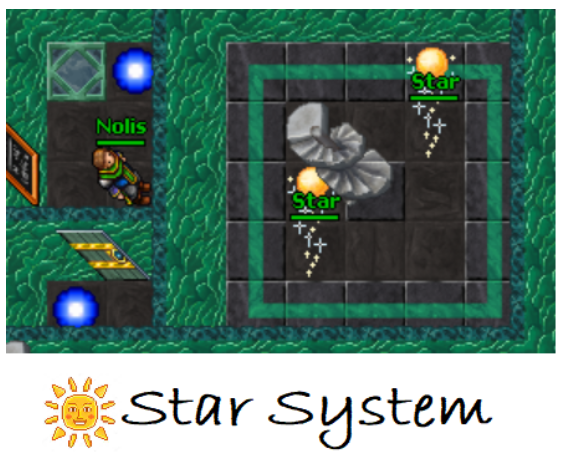
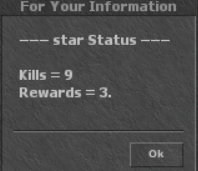
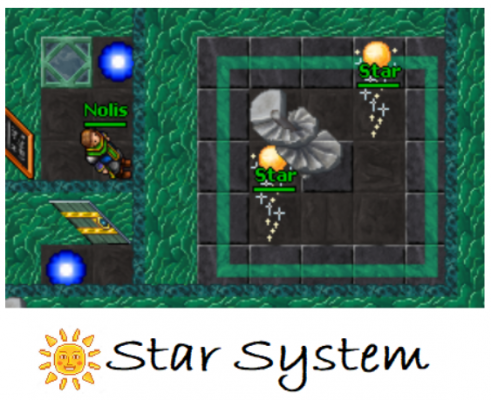
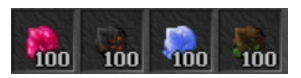
Feito por: @Storm (testado em tfs 0.4 - firelement, funciona em 0.3) Quem jogou rozinx server provavelmente conheceu a febre do sistema de weapons por points e consecutivamente o sistema Aegis. Pra quem não conhece, no rozinx haviam vários baús e você podia comprar os itens usando pontos. Esses pontos eram obtidos donatando (por volta de 2007-2015), porém na nova geração (2018) foi introduzido o sistema Aegis, um monstro que após você matá-lo 3 vezes recebia 1 ponto vip, e podia então coletar esses pontos para obter as armas pagas de forma gratuita. Trago a vocês uma versão diferente do Aegis. O Star system. Gratidão ao @Storm por criar o script e refazê-lo quase um ano depois, após não reconhecer o próprio script ? Vc é fera! ? Como funciona: O star system funciona em conjunto com o Advanced Minin System (elements) (se você preferir), diferente do servidor Rozinx, que entrega pontos vip, o Star system entrega 1 dos 4 massive element substance aleatoriamente (as pedras mais raras e difíceis de obter no mining: Earth, Ice, Fire ou Energy) após você matar 3 estrelas. INSTALAÇÃO -- Código para entregar item após matar o monstro data/creaturescripts/scripts/star.lua: local config = { monster = { name = "star", count = 3, storage = 6665, storage2 = 7775 }, premio = {{8298, 1}, {8302, 1}, {8299, 1}, {8303, 1}} -- {item_id, count} } function onDeath(cid, corpse, deathList) local killer = deathList[1] local pos = getCreaturePosition(killer) if not isMonster(cid) or not isPlayer(killer) then return true end if getPlayerStorageValue(killer, config.monster.storage) == -1 then setPlayerStorageValue(killer, config.monster.storage, 0) end setPlayerStorageValue(killer, config.monster.storage, getPlayerStorageValue(killer, config.monster.storage) + 1) if getPlayerStorageValue(killer, config.monster.storage) == config.monster.count then doSendMagicEffect(pos, CONST_ME_MAGIC_BLUE) local item = config.premio[math.random(1, #config.premio)] doPlayerAddItem(killer, item[1], item[2]) if getPlayerStorageValue(killer, config.monster.storage2) == -1 then setPlayerStorageValue(killer, config.monster.storage2, 0) end setPlayerStorageValue(killer, config.monster.storage2, getPlayerStorageValue(killer, config.monster.storage2) + 1) setPlayerStorageValue(killer, config.monster.storage, 0) doPlayerSendTextMessage(killer, MESSAGE_STATUS_CONSOLE_RED, "You receive ".. item[2] .." ".. getItemNameById(item[1]) .." by kill ".. config.monster.count .."x the monster ".. config.monster.name ..".") return true else doPlayerSendTextMessage(killer, MESSAGE_STATUS_CONSOLE_BLUE, "You killed ".. getPlayerStorageValue(killer, config.monster.storage) .." of ".. config.monster.count .." ".. config.monster.name ..", There are still ".. config.monster.count - (getPlayerStorageValue(killer, config.monster.storage)) .." ".. config.monster.name .." left to receive the reward.") return true end return true end data/creaturescripts/creaturescripts.xml: <!-- star system --> <event type="death" name="Star" event="script" value="star.lua"/> -- Código para checar monstros abatidos e recompensas obtidas data/talkactions/scripts/starcheck.lua: local config = { name = "star", count = 3, storage2 = 7775 } function onSay(cid, words, param, channel) doPlayerPopupFYI(cid, "--- ".. config.name .." Status ---\n\nKills = ".. config.count * getPlayerStorageValue(cid, config.storage2) .."\nRewards = ".. getPlayerStorageValue(cid, config.storage2) ..".") return true end data/talkactions/talkactions.xml: <talkaction log="yes" words="!starcheck" event="script" value="starcheck.lua" /> -- Código do monstro data/monster/star.lua: <?xml version="1.0" encoding="UTF-8"?> <monster name="Star" nameDescription="a star" race="blood" experience="10000" speed="500" manacost="200"> <health now="15000000" max="15000000"/> <look type="294" corpse="6324"/> <targetchange interval="2000" chance="0"/> <strategy attack="100" defense="0"/> <flags> <flag summonable="0"/> <flag attackable="1"/> <flag hostile="1"/> <flag illusionable="0"/> <flag convinceable="0"/> <flag pushable="0"/> <flag canpushitems="1"/> <flag canpushcreatures="1"/> <flag targetdistance="1"/> <flag staticattack="1"/> <flag runonhealth="0"/> </flags> <attacks> <attack name="melee" interval="2000" skill="1000" attack="1000"/> <attack name="holy" interval="1500" chance="1000" range="6" radius="7" target="0" min="-100" max="-500"> <attribute key="areaEffect" value="holydamage"/> </attack> <attack name="outfit" interval="150" chance="10000" range="6" monster="star" duration="1000"> <attribute key="areaEffect" value="holydamage"/> </attack> <attack name="energy" interval="2000" chance="1000" range="6" radius="6" target="0" min="-200" max="-300"> <attribute key="areaEffect" value="purpleenergy"/> </attack> <attack name="fire" interval="2000" chance="1000" range="6" radius="5" target="0" min="-100" max="-500"> <attribute key="areaEffect" value="holydamage"/> </attack> <attack name="physical" interval="2000" chance="1000" range="6" radius="4" target="0" min="-200" max="-300"> <attribute key="areaEffect" value="groundshaker"/> </attack> <attack name="death" interval="3000" chance="1000" range="6" radius="3" target="0" min="-200" max="-700"> <attribute key="areaEffect" value="holyarea"/> </attack> </attacks> <elements> <element energyPercent="20"/> <element holyPercent="40"/> <element icePercent="-40"/> <element firePercent="30"/> </elements> <script> <event name="Star"/> </script> <script> <event name="noattack"/> </script> </monster> data/monster/monster.xml: <monster name="star" file="star.xml"/> -- Código para os monstros não se matarem com as magias data/creaturescripts/scripts/noattack.lua: function onStatsChange(cid, attacker, type, combat, value) -- This should block all damage monster cause on eachother expect player summons if isMonster(cid) and isMonster(attacker) then local master = getCreatureMaster(cid) if not master or not isPlayer(master) then return false end end return true end data/creaturescripts/creaturescripts.xml: <event type="statschange" name="noattack" event="script" value="noattack.lua"/>

 5 pontos
 -
Elements - Advanced Mining System (skills + coins + levels)
FlameArcixt e um outro reagiu a Cat por uma resposta no tópico
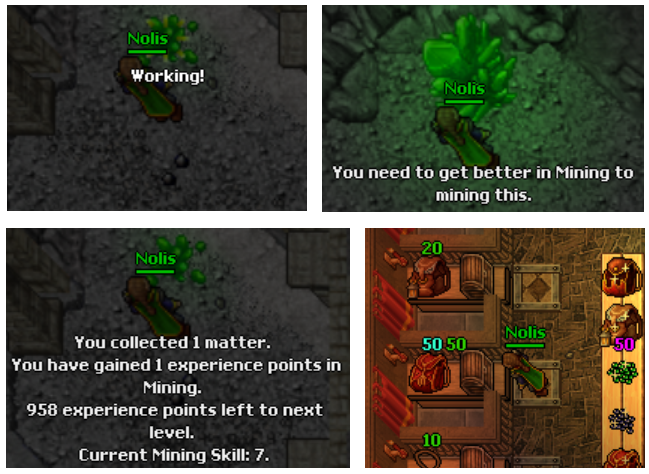
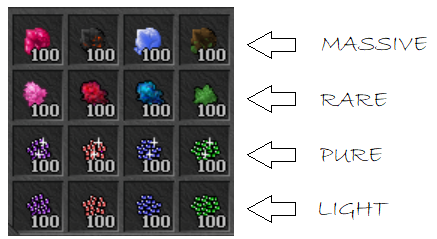
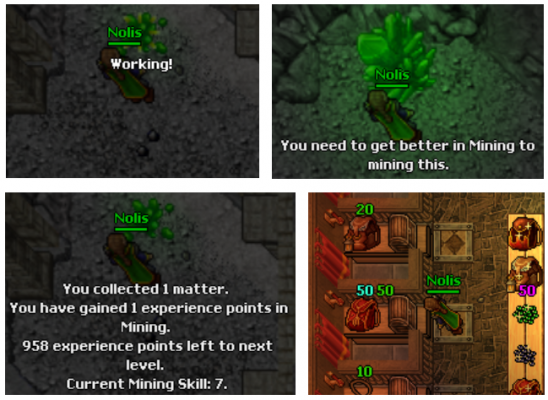
2 pontosTrago a vocês esse sistema, originalmente produzido para um servidor custom 8.60. (testado em 0.4 - firelement). Acredito que será mais útil pra vocês do que pra mim nesse momento. Se alguém puder acrescentar informações a respeito do uso em diferentes tfs agradeço. ? INFORMAÇÕES P = Posso mineirar vários itens nesse sistema? R = Sim, existem quatro elementos e quatro categorias, possibilitando gerar até 16 produtos finais nas minas. Essa configuração pode ser editada facilmente. Caso queira usar da maneira como o script está feito, ao mineirar você poderá coletar as seguintes pedras: P = Mas as pedras caem aleatoriamente? R = Não, esse mining possui um SKILL, conforme você mineira o skill aumenta e consecutivamente o seu LEVEL. Inicia com pedras Light, depois pure, rare e massive. Você pode editar facilmente o modo como a exp sobe, os leveis necessários para executar cada ação e as pedras. P = Qual a utilidade das pedras elementares? R = Na ideia original, projetei o sistema para que as pedras fossem gastas ao comprar itens em baús, mas fica a seu critério como utilizá-las. Por exemplo, um colar de proteção earth/ice precisaria ser pago com pedras de earth e ice. Incluirei no tópico o script utilizado no baú e o script para trocar as pedras quando atingir 100 unidades cada. Veja o exemplo: INSTALAÇÃO Em data/actions/script crie um arquivo .lua chamado elementalmining e cole o código dentro: local config = { maxmininglevel = 100, storagemining = 10000, expperlevel = 1000, experiencemining = 10001 } local stone = { blue = {8637, 8633, 9798, 1354}, green = {8640, 8636, 9791, 1353}, lightblue = {8638, 8634, 9790, 12344}, red = {8639, 8635, 9788, 1355}, } local stones = { crystal = {stone.blue[1], stone.green[1], stone.lightblue[1], stone.red[1]}, lcrystal = {stone.blue[2], stone.green[2], stone.lightblue[2], stone.red[2]}, pcrystal = {stone.blue[3], stone.green[3], stone.lightblue[3], stone.red[3]}, scrystal = {stone.blue[4], stone.green[4], stone.lightblue[4], stone.red[4]}, } local ore = { blue = {2146, 7759, 5905, 8302}, green = {2149, 7761, 12396 ,8298}, lightblue = {2150, 7762, 12575, 8303}, red = {2147, 7760, 5906, 8299}, } local ores = { ore.blue[1], ore.blue[2], ore.blue[3], ore.blue[4], ore.green[1], ore.green[2], ore.green[3], ore.green[4], ore.lightblue[1], ore.lightblue[2], ore.lightblue[3], ore.lightblue[4], ore.red[1], ore.red[2], ore.red[3], ore.red[4]} local levels = { { level = {0,19}, stone = {stones.crystal[1], stones.crystal[2], stones.crystal[3], stones.crystal[4]}, items = {ores[1],ores[5], ores[9], ores[13]}, iselect = 0, bstart = 1, gstart = 2, lbstart = 3, rstart = 4, chance = 10, -- 30 qtdmax = 1, expgainmin = 1, --15 expgainmax = 1 --50 }, { level = {20,49}, stone = {stones.crystal[1], stones.crystal[2], stones.crystal[3], stones.crystal[4], stones.lcrystal[1], stones.lcrystal[2], stones.lcrystal[3], stones.lcrystal[4]}, items = {ores[1],ores[2], ores[5], ores[6], ores[9],ores[10], ores[13], ores[14]}, iselect = 1, bstart = 1, gstart = 3, lbstart = 5, rstart = 7, chance = 10, qtdmax = 1, expgainmin = 1, expgainmax = 1 }, { level = {50,69}, stone = {stones.crystal[1], stones.crystal[2], stones.crystal[3], stones.crystal[4], stones.lcrystal[1], stones.lcrystal[2], stones.lcrystal[3], stones.lcrystal[4], stones.pcrystal[1], stones.pcrystal[2], stones.pcrystal[3], stones.pcrystal[4]}, items = {ores[1],ores[2], ores[3], ores[5], ores[6], ores[7], ores[9],ores[10], ores[11], ores[13], ores[14], ores[15]}, iselect = 2, bstart = 1, gstart = 4, lbstart = 7, rstart = 10, chance = 10, qtdmax = 1, expgainmin = 1, expgainmax = 1 }, { level = {70,89}, stone = {stones.crystal[1], stones.crystal[2], stones.crystal[3], stones.crystal[4], stones.lcrystal[1], stones.lcrystal[2], stones.lcrystal[3], stones.lcrystal[4], stones.pcrystal[1], stones.pcrystal[2], stones.pcrystal[3], stones.pcrystal[4], stones.scrystal[1], stones.scrystal[2], stones.scrystal[3], stones.scrystal[4]}, items = {ores[1],ores[2], ores[3], ores[4], ores[5], ores[6], ores[7], ores[8], ores[9],ores[10], ores[11], ores[12], ores[13], ores[14], ores[15], ores[16]}, iselect = 3, bstart = 1, gstart = 5, lbstart = 9, rstart = 13, chance = 10, qtdmax = 1, expgainmin = 1, expgainmax = 1 }, { level = {90,100}, stone = {stones.crystal[1], stones.crystal[2], stones.crystal[3], stones.crystal[4], stones.lcrystal[1], stones.lcrystal[2], stones.lcrystal[3], stones.lcrystal[4], stones.pcrystal[1], stones.pcrystal[2], stones.pcrystal[3], stones.pcrystal[4], stones.scrystal[1], stones.scrystal[2], stones.scrystal[3], stones.scrystal[4]}, items = {ores[1],ores[2], ores[3], ores[4], ores[5], ores[6], ores[7], ores[8], ores[9],ores[10], ores[11], ores[12], ores[13], ores[14], ores[15], ores[16]}, iselect = 3, bstart = 1, gstart = 5, lbstart = 9, rstart = 13, chance = 10, qtdmax = 1, expgainmin = 1, expgainmax = 1 } } function onUse(cid, item, fromPosition, itemEx, toPosition) local getMiningLevel = getPlayerStorageValue(cid, config.storagemining) local getMiningExp = getPlayerStorageValue(cid, config.experiencemining) if getMiningLevel == -1 then setPlayerStorageValue(cid, config.storagemining, 0) end if getMiningExp < 0 then setPlayerStorageValue(cid, config.experiencemining, 0) end if (isInArray(stones.crystal, itemEx.itemid) or isInArray(stones.lcrystal, itemEx.itemid) or isInArray(stones.pcrystal, itemEx.itemid) or isInArray(stones.scrystal, itemEx.itemid)) then for a = 1, #levels do min = levels[a].level[1]; max = levels[a].level[2] if (getMiningLevel >= min and getMiningLevel <= max) then if isInArray(levels[a].stone, itemEx.itemid) then if (math.random(1, 100) <= levels[a].chance) then quantity = math.random(1, levels[a].qtdmax) experience = math.random(levels[a].expgainmin, levels[a].expgainmax) if isInArray(stone.blue, itemEx.itemid) then iselection = math.random(levels[a].bstart, levels[a].bstart + levels[a].iselect) collect = levels[a].items[iselection] end if isInArray(stone.green, itemEx.itemid) then iselection = math.random(levels[a].gstart, levels[a].gstart + levels[a].iselect) collect = levels[a].items[iselection] end if isInArray(stone.lightblue, itemEx.itemid) then iselection = math.random(levels[a].lbstart, levels[a].lbstart + levels[a].iselect) collect = levels[a].items[iselection] end if isInArray(stone.red, itemEx.itemid) then iselection = math.random(levels[a].rstart, levels[a].rstart + levels[a].iselect) collect = levels[a].items[iselection] end if getMiningLevel == 100 then doSendMagicEffect(toPosition, 9) doPlayerSendTextMessage(cid, 22, text) doPlayerAddItem(cid, collect, quantity) elseif getMiningLevel <= 99 then if getMiningExp >= config.expperlevel then doSendMagicEffect(getCreaturePosition(cid), 49) setPlayerStorageValue(cid, config.storagemining, getMiningLevel + 1) setPlayerStorageValue(cid, config.experiencemining, getMiningExp - config.expperlevel) text = "You collected " ..quantity.. " matter" ..(quantity > 1 and "s" or "").. ". \n You have gained " ..experience.. " experience points in Mining. \n You advanced from mining skill level " ..getMiningLevel.. " to mining skill level " ..(getMiningLevel + 1).. "." else setPlayerStorageValue(cid, config.experiencemining, getMiningExp + experience) text = "You collected " ..quantity.. " matter" ..(quantity > 1 and "s" or "").. ". \n You have gained " ..experience.. " experience points in Mining. \n" ..(config.expperlevel - getMiningExp - experience).. " experience points left to next level. \nCurrent Mining Skill: " ..getMiningLevel.. "." end doSendMagicEffect(toPosition, 9) doPlayerSendTextMessage(cid, 22, text) doPlayerAddItem(cid, collect, quantity) end else doSendMagicEffect(toPosition, 3) doSendAnimatedText(getCreaturePosition(cid), "Working!", COLOR_WHITE) end else doPlayerSendTextMessage(cid, 22, "You need to get better in Mining to mining this.") end end end else doSendMagicEffect(getCreaturePosition(cid), 2) doPlayerSendTextMessage(cid, 22, "You can't mining this.") end end Em data/actions/actions.xml use: <!-- MINING --> <action itemid="2553" event="script" value="elementalmining.lua"/> Se tiver dúvidas a respeito de como configurar pergunte no tópico. As partes editáveis são: Local config, local Stone, local Ore, local Levels. Note que local Levels indica que algumas pedras só podeerão ser mineiradas ao ter mining level superior. Configurações das pedras: Em data/items/items.xml troque os nomes de cada pedra (os nomes ficam a seu critério ;p) <item id="2149" article="a" name="light earth substance" plural="light earth substance"> <attribute key="weight" value="1000" /> </item> <item id="2146" article="a" name="light ice substance" plural="light ice substance"> <attribute key="weight" value="1000" /> </item> <item id="2147" article="a" name="light fire substance" plural="light fire substance"> <attribute key="weight" value="1000" /> </item> <item id="2150" article="a" name="light energy substance" plural="light energy substance"> <attribute key="weight" value="1000" /> </item> <item id="7761" article="a" name="pure earth substance" plural="pure earth substance"> <attribute key="weight" value="1000" /> </item> <item id="7759" article="a" name="pure ice substance" plural="pure ice substance"> <attribute key="weight" value="1000" /> </item> <item id="7760" article="a" name="pure fire substance" plural="pure fire substance"> <attribute key="weight" value="1000" /> </item> <item id="7762" article="a" name="pure energy substance" plural="pure energy substance"> <attribute key="weight" value="1000" /> </item> <item id="12396" article="a" name="rare earth matter" plural="rare earth substance"> <attribute key="weight" value="1000" /> </item> <item id="6551" article="a" name="rare ice substance" plural="rare ice substance"> <attribute key="weight" value="1000" /> </item> <item id="6550" article="a" name="rare fire substance" plural="rare fire substance"> <attribute key="weight" value="1000" /> </item> <item id="12575" article="a" name="rare energy substance" plural="rare energy substance"> <attribute key="weight" value="1000" /> </item> <item id="8298" name="massive earth substance" plural="massive earth substance"> <attribute key="weight" value="1000" /> </item> item id="8302" name="massive ice substance" plural="massive ice substance"> <attribute key="weight" value="1000" /> </item> <item id="8303" name="massive energy substance" plural="massive energy substance"> <attribute key="weight" value="1000" /> </item> <item id="8299" name="massive fire substance" plural="massive fire substance"> <attribute key="weight" value="1000" /> </item> TRANSFORMAR PEDRAS EM MOEDAS Em data/actions/scripts/tools crie um arquivo .lua e nomeie como changecoin: local COINS = { LIGHT = { EARTH_SUBSTANCE = 2149, ICE_SUBSTANCE = 2146, ENERGY_SUBSTANCE = 2150, FIRE_SUBSTANCE = 2147 }, PURE = { EARTH_SUBSTANCE = 7761, ICE_SUBSTANCE = 7759, ENERGY_SUBSTANCE = 7762, FIRE_SUBSTANCE = 7760 }, RARE = { EARTH_SUBSTANCE = 12396, ICE_SUBSTANCE = 6551, ENERGY_SUBSTANCE = 12575, FIRE_SUBSTANCE = 6550 }, MASSIVE = { EARTH_SUBSTANCE = 8298, ICE_SUBSTANCE = 8302, ENERGY_SUBSTANCE = 8303, FIRE_SUBSTANCE = 8299 } } local TRANSFORM = { [COINS.LIGHT.EARTH_SUBSTANCE] = { TO = COINS.PURE.EARTH_SUBSTANCE }, [COINS.LIGHT.ICE_SUBSTANCE] = { TO = COINS.PURE.ICE_SUBSTANCE }, [COINS.LIGHT.ENERGY_SUBSTANCE] = { TO = COINS.PURE.ENERGY_SUBSTANCE }, [COINS.LIGHT.FIRE_SUBSTANCE] = { TO = COINS.PURE.FIRE_SUBSTANCE }, [COINS.PURE.EARTH_SUBSTANCE] = { FROM = COINS.LIGHT.EARTH_SUBSTANCE, TO = COINS.RARE.EARTH_SUBSTANCE }, [COINS.PURE.ICE_SUBSTANCE] = { FROM = COINS.LIGHT.ICE_SUBSTANCE, TO = COINS.RARE.ICE_SUBSTANCE }, [COINS.PURE.ENERGY_SUBSTANCE] = { FROM = COINS.LIGHT.ENERGY_SUBSTANCE, TO = COINS.RARE.ENERGY_SUBSTANCE }, [COINS.PURE.FIRE_SUBSTANCE] = { FROM = COINS.LIGHT.FIRE_SUBSTANCE, TO = COINS.RARE.FIRE_SUBSTANCE }, [COINS.RARE.EARTH_SUBSTANCE] = { FROM = COINS.PURE.EARTH_SUBSTANCE, TO = COINS.MASSIVE.EARTH_SUBSTANCE }, [COINS.RARE.ICE_SUBSTANCE] = { FROM = COINS.PURE.ICE_SUBSTANCE, TO = COINS.MASSIVE.ICE_SUBSTANCE }, [COINS.RARE.ENERGY_SUBSTANCE] = { FROM = COINS.PURE.ENERGY_SUBSTANCE, TO = COINS.MASSIVE.ENERGY_SUBSTANCE }, [COINS.RARE.FIRE_SUBSTANCE] = { FROM = COINS.PURE.FIRE_SUBSTANCE, TO = COINS.MASSIVE.FIRE_SUBSTANCE }, [COINS.MASSIVE.EARTH_SUBSTANCE] = { FROM = COINS.RARE.EARTH_SUBSTANCE }, [COINS.MASSIVE.ICE_SUBSTANCE] = { FROM = COINS.RARE.ICE_SUBSTANCE }, [COINS.MASSIVE.ENERGY_SUBSTANCE] = { FROM = COINS.RARE.ENERGY_SUBSTANCE }, [COINS.MASSIVE.FIRE_SUBSTANCE] = { FROM = COINS.RARE.FIRE_SUBSTANCE } } function onUse(cid, item, fromPosition, itemEx, toPosition) if(getPlayerFlagValue(cid, PLAYERFLAG_CANNOTPICKUPITEM)) then return false end local COIN = TRANSFORM[item.itemid] if(not COIN) then return false end if(COIN.TO ~= nil and item.type == ITEMCOUNT_MAX) then doChangeTypeItem(item.uid, item.type - item.type) doPlayerAddItem(cid, COIN.TO, 1) elseif(COIN.FROM ~= nil) then doChangeTypeItem(item.uid, item.type - 1) doPlayerAddItem(cid, COIN.FROM, ITEMCOUNT_MAX) end return true end Em data/actions/actions.xml acrescente: <action itemid="2149" event="script" value="tools/changecoin.lua"/> <action itemid="2146" event="script" value="tools/changecoin.lua"/> <action itemid="2150" event="script" value="tools/changecoin.lua"/> <action itemid="2147" event="script" value="tools/changecoin.lua"/> <action itemid="7761" event="script" value="tools/changecoin.lua"/> <action itemid="7759" event="script" value="tools/changecoin.lua"/> <action itemid="7762" event="script" value="tools/changecoin.lua"/> <action itemid="7760" event="script" value="tools/changecoin.lua"/> <action itemid="12396" event="script" value="tools/changecoin.lua"/> <action itemid="6551" event="script" value="tools/changecoin.lua"/> <action itemid="12575" event="script" value="tools/changecoin.lua"/> <action itemid="6550" event="script" value="tools/changecoin.lua"/> <action itemid="8298" event="script" value="tools/changecoin.lua"/> <action itemid="8302" event="script" value="tools/changecoin.lua"/> <action itemid="8303" event="script" value="tools/changecoin.lua"/> <action itemid="8299" event="script" value="tools/changecoin.lua"/> Script adicional: Bau/Chest - Comprar mesmo item com duas moedas diferentes Isso é tudo, façam bom uso!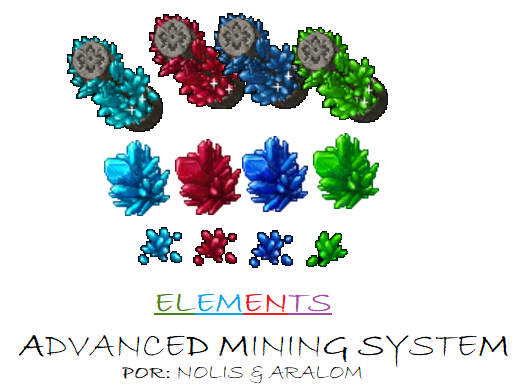
 2 pontos
 -
Otg Server Global Somos o Otg Server, projeto baseado no TFS 1.3 e OTX3.2, Se trata de um servidor baseado no GLOBAL MAP RL. Aqui você encontrará baixo uso de recursos como CPU / memoria, prezamos muito por estabilidade e atualizações constantes. Agradecemos primeiramente ao Tibiaking pela oportunidade nos concedida, somos parceiros oficiais do Tibiaking.com melhor Forum Brasileiro! Especificações : - Global Map FULL RL - Maioria das Quests com Quest Log 100% - Anti Rollback + Auto Restart 100% - Source Otimizada (baixo consumo de CPU e memoria) - Sem Bug de Clonar dinheiro (Npcs Refeitos - Exercise Training 100% - Raids 100% - Monstros 100% Imagens : THAIS TEMPLE FALCONS NEW ASURAS WZ 4,5,6 Downloads : PROJETO OFFICIAL GITHUB: https://github.com/otg-br/global-11x TUTORIAL PARA COMPILAÇÃO: https://github.com/otg-br/global-11x/wiki EXE compilado WIN11 64bits: https://github.com/otg-br/global-11x/blob/main/Executavel compilado win11 64bits.rar GRUPO WHATSAPP OTG SERVER: https://chat.whatsapp.com/EWV3dVvS6nt1em7q23FGu7 Créditos : The Forgotten Server Otland Mark Samman Mattyx Otx Erick Nunes Johncore Otg Server contribuidores OTX contribuidores Otservbr Leu Marcomoa Marson Schneider Leandro Baldissera1 ponto
-
Tibia 8.60 v2 Map Editor Release (Corrige erro: Could not locate Tibia.dat and/or Tibia.spr, please navigate to your Tibia 8.60 installation folder)
betoffsoares reagiu a Cat por uma resposta no tópico
1 pontoEm alguns casos, o tibia 8.60 comum não abre de jeito nenhum no map editor, mesmo desmarcando check file signatures e configurando o path corretamente. Este é o client 8.60 adaptado para o Remere's Map Editor. Resolvi postar já que ele foi removido do site oficial do RME. (ficou apenas a versão para linux lá) Se estiver tendo problemas para abrir a versão 8.60, tente utilizar este. Baixar o Tibia Client 8.60 que funciona no Remere’s Map Editor Essa versão do Tibia 8.60 client resolve o erro unsupported client version ou Could not locate tibia.dat and/or tibia.spr, please navigate to your tibia 8.60 installation folder. Downloads https://tibiaking.com/applications/core/interface/file/attachment.php?id=47333 Scan: https://www.virustotal.com/gui/file/333e172ac49ba2028db9eb5889994509e7d2de28ebccfa428c04e86defbe15cc1 ponto -
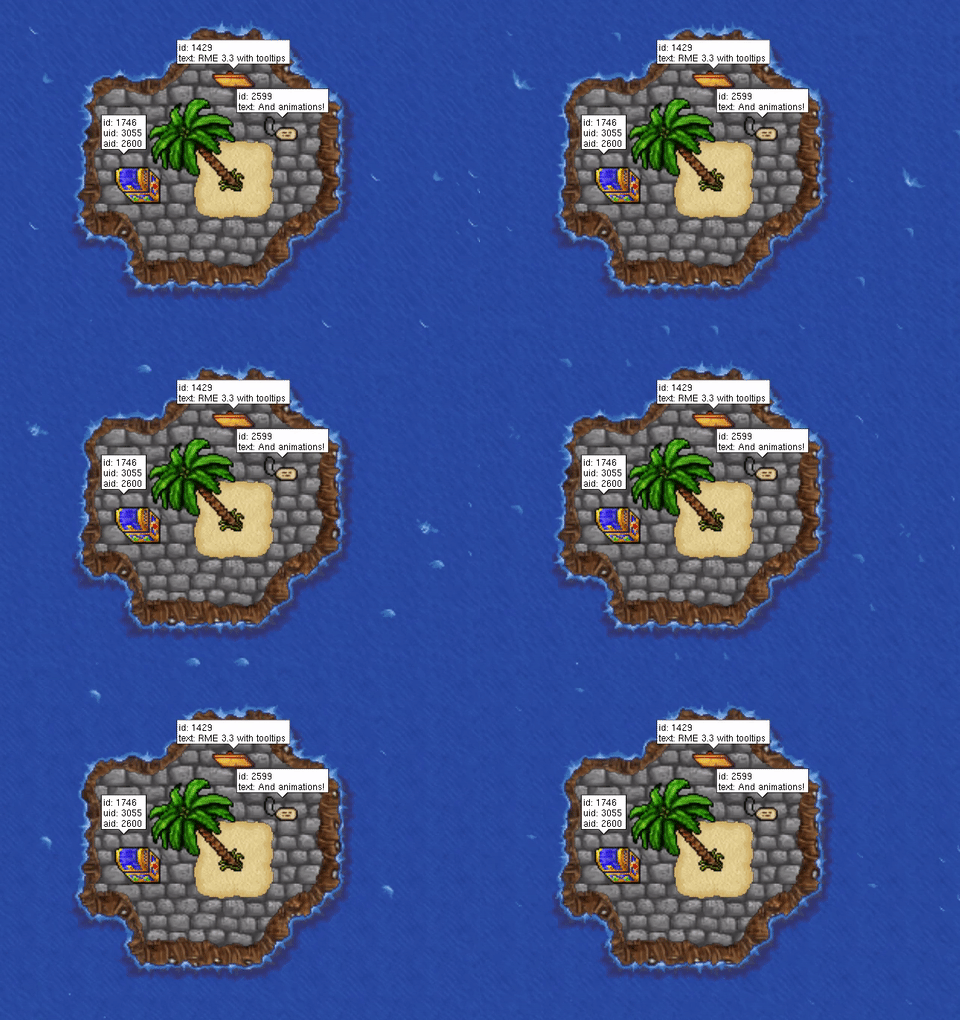
Remere's Map Editor 3.3 Características: Suporte para dicas no mapa Suporte para visualização de animações Restaurar a última posição ao abrir um mapa Exportar resultado de pesquisa para um arquivo txt Melhorias no pincel Waypoint Melhor suporte em tela cheia no macOS Corrigido bugs: Itens maiores que 64x64 agora são exibidos corretamente Corrigido potencial falha ao usar o pincel de ponto de referência Corrigido um bug em que você não conseguia abrir arquivos de mapas clicando neles enquanto o editor estava sendo executado Agora você pode abrir a pasta de extensões no macOS Corrigido um bug em que uma pesquisa de item não exibiria nenhum resultado no macOS Corrigido vários problemas relacionados à edição de casas no macOS Remeres suporte 11.0 Download Source Creditos GitHub Topico original
 1 ponto
 -
Fala galera bom eu vi alguns tópicos de pessoas com problemas no item.otb e alguns conhecidos falando que é muito trabalhoso adicionar item por item no item.otb seguinte existe uma forma muito pratica de preencher o item.otb corretamente sem esforço usando um software, é um itemeditor com algumas ferramentas. Link para o Software Github Source obs: suporta spr e dat estendidos 1- configurando o itemeditor Ao abrir o itemeditor clique em file e preferences vai aparecer essa janela Nessa aba vai ser igual ao object builder você vai selecionar a pasta que esta o spr e dat do seu client e se ele é estendido e se ele tem transparência caso tiver marque a caixa correspondente depois clique em confirm e abra o item.otb do seu servidor obs: crie sempre um backup uma copia do item.otb antes de qualquer alteração sempre após fazer a alteração e testar ver que esta tudo certo faça uma nova copia com a alteração assim caso tiver qualquer problema com o mesmo não vai perder nada. 2- Adicionando todos os novos items do seu client no item.otb Após abrir o item.otb clique na opção Tools e Update OTB Version vai abrir essa janela nessa parte você vai escolher a versão do seu client a mesma correspondente do seu object builder ao abrir o client caso não souber abra o client usando o object builder para verificar selecione a versão clique em Select Após clicar em select vai abrir essa outra janela basta clicar em OK e esperar o procedimento após o procedimento estar concluído vai ficar assim vá em file e clique em save para salvar as alterações e os items novos adicionados no client vão estar no item.otb basta configurar o item.xml e pronto Obs: Ele vai se basear nos items e como foi configurado no object builder então todas as alterações de items ou qualquer outra coisa deve ser feita no object builder e depois ser feito esse procedimento para ocorrer tudo perfeitamente obs: Toda vez que for fazer esse procedimento o client não pode estar aberto no object builder então certifique-se de fechar o client no object builder antes de iniciar esse procedimento Espero que tenham gostado e que ajude vocês By: Brunds1 ponto
-
Utilizando o Visual Studio Code, Notepad++ nunca mais
DATA Vinny reagiu a Reds por uma resposta no tópico
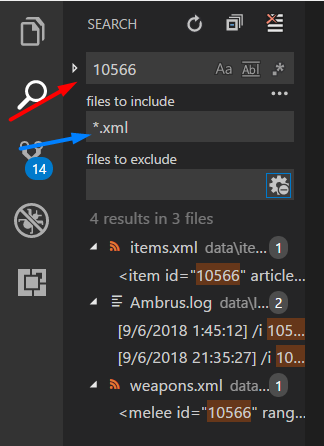
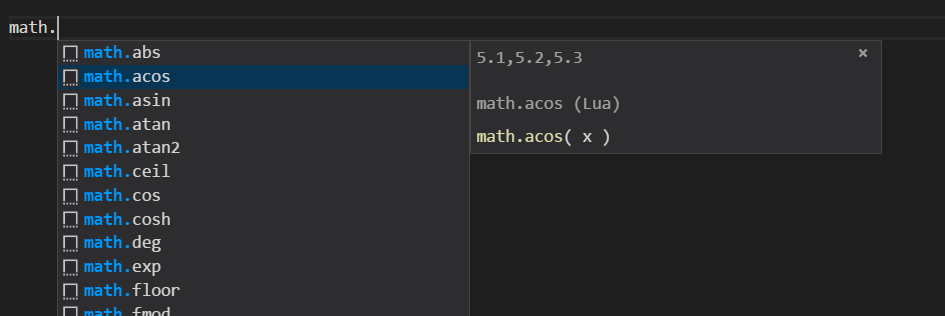
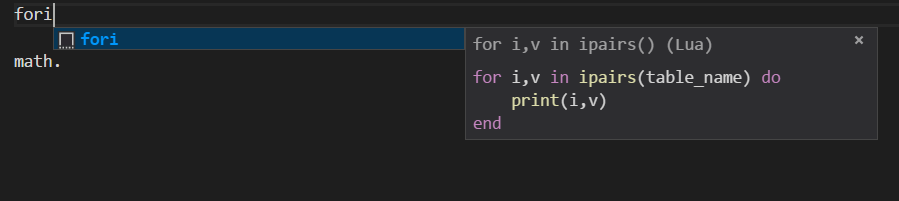
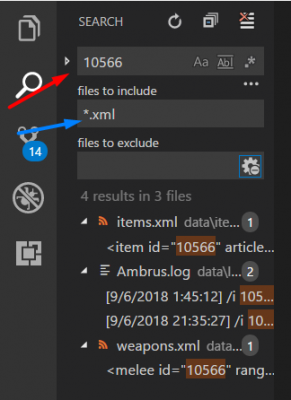
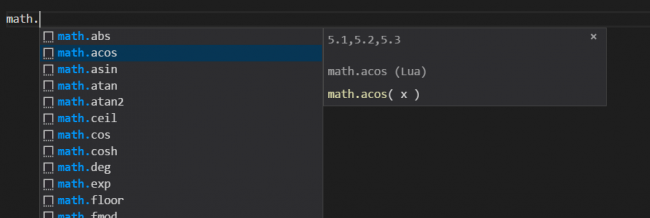
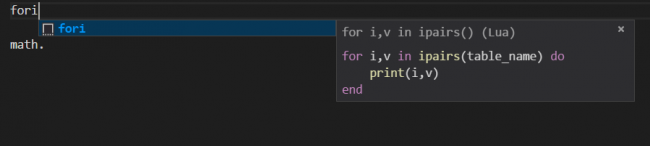
1 pontoFala galera, por muito tempo utilizei o notepad++ para desenvolver meus códigos em lua. Agora voltando a desenvolver meu servidor, utilizo o Visual Studio Code e digo que ajuda muito em relação ao notepad++. Vantagens: 1) Você pode abrir a pasta de seu servidor, tendo uma estrutura semelhante a um projeto Java por exemplo, tudo isso de uma forma bem fácil. Se não me engano o notepad++ tem uma funcionalidade parecida, mas acredito que a maioria aqui não usa. Para fazer isso é só utilizar o atalho CTRL + K + O, ou file > Open Folder e selecionar a pasta de seu servidor. 2) Diversos atalhos. Com o VS Code, você pode utilizar atalhos, como o CTRL + P, ao fazer isso ele abre um box no topo da IDE onde o desenvolvedor pode escrever o nome do arquivo e ele encontra dentro do projeto. Fazia mais de ano que eu não abria meu servidor, então eu não lembrava de diversas coisas, como os monstros que dropavam o item 10566, então com o Visual Studio Code, eu consegui descobrir que eu não tinha configurado nenhum monstro para dropar aquele item. Para fazer essa pesquisa utilizei o atalho CTRL + SHIFT + F, onde ele pesquisa alguma palavra em específica entre os arquivos do seu projeto. E muitos outros, que você pode encontrar pesquisando pela internet. 3) Diversas extensões. Com o VS Code você pode instalar diversas extensões que auxiliam no seu desenvolvimento, por enquanto adicionei a padrão de Lua. Com ela, ao escrever códigos Lua é utilizado intellisense, facilitando muito no desenvolvimento. 4) Criação de snippets para utilização das funções do Tibia. 5) Muito mais.. Utilizo há algum tempo o VS Code para desenvolvimento de front e sempre descubro coisas novas sobre ele.. O VS Code esta disponível em: https://code.visualstudio.com/download.

 1 ponto
 -
Daora @Nolis, parabéns e obrigado pelo conteúdo!1 ponto
-
Ja cheguei a jogar o servidor porém eu nem lembrava mais disso, valeu pelo conteúdo.1 ponto
-
Caramba, realmente é um programa que ajuda muito, principalmente essa parte de fazer buscas de palavras chaves. Só tô tendo problema em abrir a página deles, nesse momento de meu comentário. hahah1 ponto
-
Sistema do Pagseguro dando erro em Gesior
Kramer reagiu a Ivens Pontes por uma resposta no tópico
1 pontosó instalar o curl. sudo apt install php-curl1 ponto -
AJUDA AQUI !
Ricardo Milos Otzero reagiu a DdJs por uma resposta no tópico
1 pontoNão sei se tem como alterar a ordem de importância das mensagens. E o motd não aparece sempre que loga, acho que só da primeira vez que abre o client.1 ponto -
@KR3 Quero itens VIP no teu server pra ajudar. UAShUAShU Brincadeira a parte, segue isso: (Lembrando que é pra TFS 0.4) Em game.cpp procure por: Party* party = player->getParty(); E adicione acima: if (invitedPlayer == player) return false;1 ponto
-
Excelente sistema!1 ponto
-
good deus dani1 ponto
-
1 pontotava sem nada pra fazer e comecei a editar um layoutzinho, no intuito de praticar. Aproveitarei e vim disponibilizar aqui, qualquer erro ou bug que acharem podem reportar que irei arrumar. Airetsam Layout Version: Gesior2012 Download: https://github.com/pedrogiampietro/AiretsamKit Images:1 ponto
-
1 pontotava sem nada pra fazer e comecei a editar um layoutzinho, no intuito de praticar. Aproveitarei e vim disponibilizar aqui, qualquer erro ou bug que acharem podem reportar que irei arrumar. Material Kit Layout Version: Gesior2012 Download: https://github.com/pedrogiampietro/MaterialKit Images: como eu comecei a fazer hoje, até o momento de postar eu já vi alguns erros, estarei fixando os mesmos e atualizando no git, abraçoxxxxxxxxxxxxxx1 ponto